Webhook configuration
PushFeedback sends feedback as a POST request to an HTTPS endpoint you control. Use webhooks to connect PushFeedback with an internal service or a tool without a dedicated integration.
Integrations are only available on the Professional and Unlimited plans. On the free plan, use email notifications instead.
Prerequisites
- A PushFeedback account. If you don't have one, sign up for free.
- A project created in your PushFeedback dashboard. If you haven't created one yet, follow the steps in the Quickstart guide.
Configure a webhook
-
Open app.pushfeedback.com and log in.
-
Go to Projects and select your project.
-
Click Settings, then under Integrations, select Webhook.
-
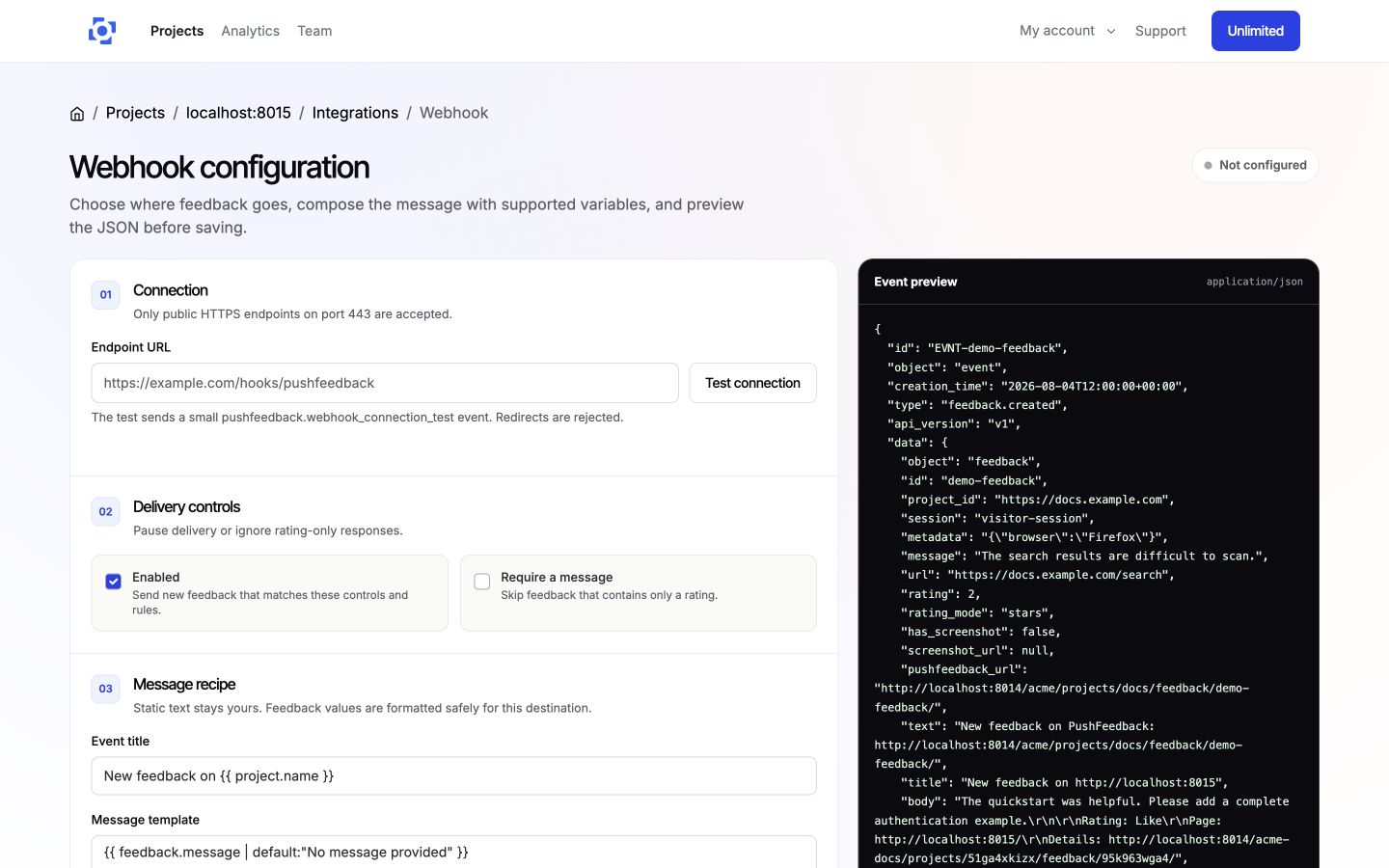
Enter a public HTTPS endpoint on port 443. Redirects are rejected.
-
Set the event title and message template. You can insert supported variables directly:
{{ feedback.message }}{{ feedback.rating_label }}{{ feedback.sentiment }}{{ feedback.email }}{{ feedback.url }}{{ feedback.detail_url }}{{ project.name }}Static text stays yours. Feedback values are formatted safely for the destination.
-
Optionally pause delivery, require a message, set Delivery rules (JSON), or add Custom fields (JSON). The editor validates rules and mappings before saving.
-
On wider screens, inspect the Event preview while you edit. It uses the project's latest feedback, or sample data when the project is empty, and does not contact your endpoint.
-
Select Test connection to POST a small
pushfeedback.webhook_connection_testevent to the entered endpoint. It is a real request, so point it at a test-safe handler. The request uses HTTPS, rejects redirects, and reports only a connection result. -
Click Save webhook.
Delivery behavior
When the integration is enabled, feedback matching your delivery controls and rules is sent to the configured webhook endpoint.
Webhook specification
The exact event payload depends on your templates and custom fields. Use the editor preview for the payload that your configuration will send. A feedback delivery contains an event envelope and rendered feedback data, similar to this example:
{
  "id": "EVNT-feedback123",
  "object": "event",
  "creation_time": "2026-08-04T08:00:00Z",
  "type": "feedback.created",
  "api_version": "v1",
  "data": {
    "object": "feedback",
    "id": "feedback123",
    "project_id": "https://docs.example.com",
    "session": "visitor-session",
    "message": "This is a sample feedback message.",
    "metadata": "{\"browser\":\"Firefox\"}",
    "url": "https://example.com/page",
    "rating": 4,
    "rating_mode": "stars",
    "has_screenshot": true,
    "screenshot_url": "https://app.pushfeedback.com/api/feedback/feedback123/screenshot/",
    "pushfeedback_url": "https://app.pushfeedback.com/team1/projects/project1/",
    "text": "New feedback on PushFeedback: https://app.pushfeedback.com/team1/projects/project1/",
    "title": "New feedback on Developer docs",
    "body": "This is a sample feedback message.\n\nRating: 4 stars",
    "fields": {
      "priority": "positive"
    }
  },
  "delivery_id": 42
}
Feedback deliveries include these request headers:
Content-Type: application/json
Idempotency-Key: pushfeedback-delivery-42
User-Agent: PushFeedback webhook delivery
X-PushFeedback-Event: feedback.created
Treat Idempotency-Key as the stable identifier for a delivery if your endpoint performs its own deduplication.
Remove the integration
To disconnect the webhook, go to the integration's settings page in your PushFeedback dashboard and click Remove, then confirm Remove integration. Confirming stops the integration from firing on new feedback immediately.